For the TI-84 Plus CE

DeltaCE

The calculus of change, shown step by step.

A computer algebra system for your calculator: math typed the way it looks, exact answers the way your textbook writes them, and the steps behind them.

Free and open source · v1.8 · a fork of FlowCE

Δx Δy
Δy / Δx = 0.000 → f′(x₀)

The tour

Seven things your calculator couldn't do before.

Δ1

The steps behind the answer

Press enter after an answer and DeltaCE shows how to get it, the way a worked example does: derivatives, integrals, limits, sums and Taylor series, and in algebra, equations and factoring. Every step names its rule.
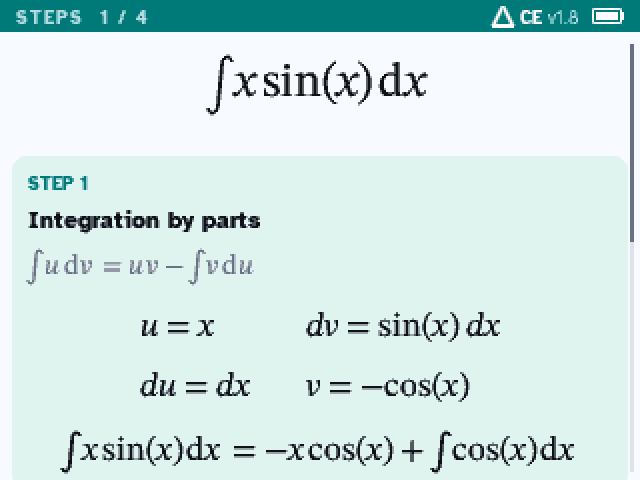
Steps for the integral of x sin x: integration by parts
Δ2

What to do next, one key away

Under each answer, its likeliest next moves: Factor, Solve = 0, Graph, or Derivative and Integral. ▶ picks one, enter does it. No menus to dig through.
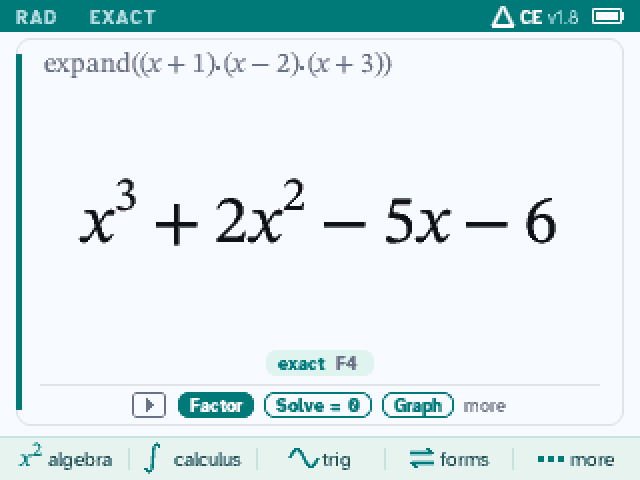
An answer on its card, with Factor, Solve = 0 and Graph under it
Δ3

Graphs that know their key points

Zeros, extrema, inflection points and crossings, found exactly and labeled on the graph. Pan and zoom while a key is held; trace, tables, tangent lines and areas. Conics, parametric and polar curves, slope fields.
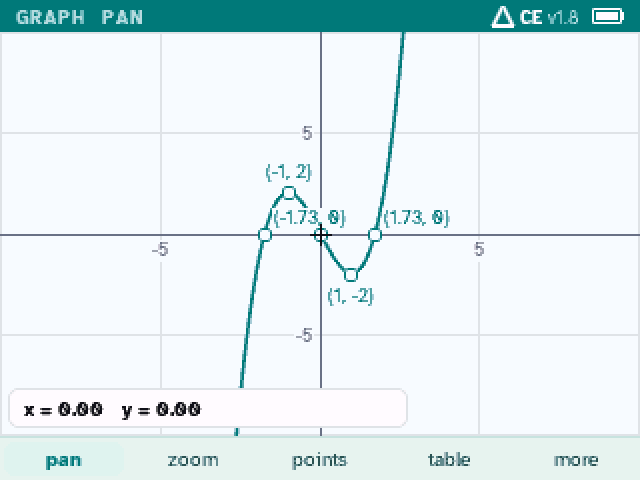
The graph of x³ − 3x with its zeros, maximum and minimum labeled
Δ4

A function, analyzed

analyze(f) walks through a function the way a test asks: domain, intercepts, symmetry, asymptotes and holes, increasing and decreasing, extrema, concavity, inflection points.
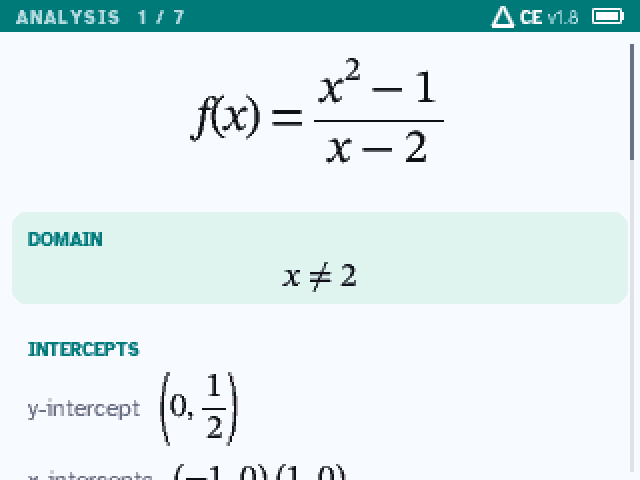
The analysis of (x² − 1)/(x − 2): its domain and intercepts
Δ5

Algebra, worked out

Linear and quadratic equations (always by the formula, every value shown), rational and radical equations with each candidate checked, factoring by GCF, special products, grouping or rational roots.
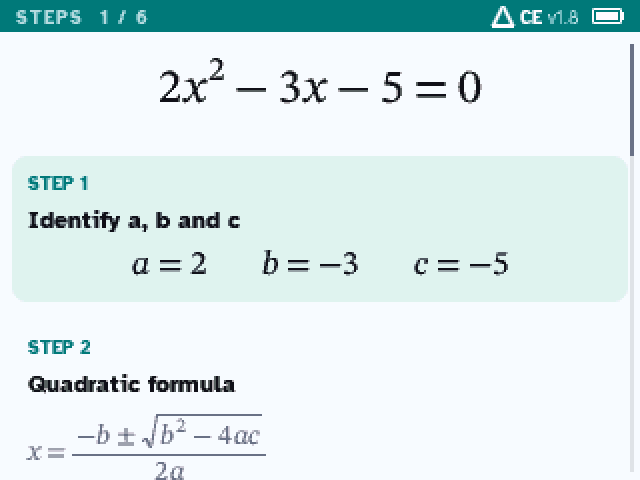
Steps for 2x² − 3x − 5 = 0: a, b and c, then the quadratic formula
Δ6

Statistics, with the fit in exact form

Type your data in two columns. Each column gets its statistics and a box plot; the points get a fitted line, quadratic, cubic, exponential, power or log curve, exact when it can be, with r and r², a predicted y, and a graph you trace point by point.
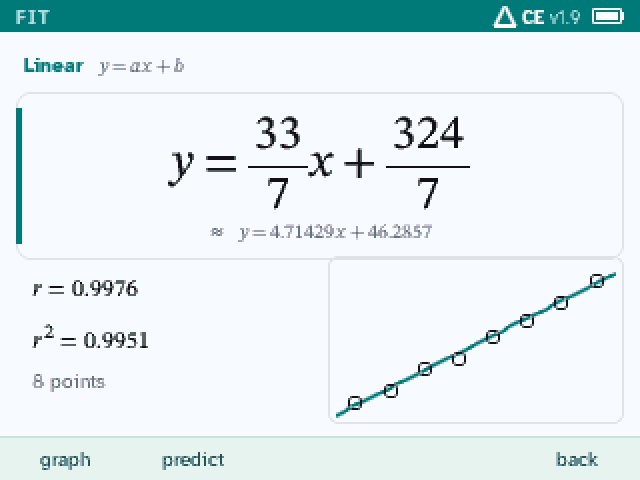
A line fitted to test scores, y = 33/7 x + 324/7, with r and r squared and the points
Δ7

Units, written properly

A units menu on alpha F4: speeds, energy, pressure and more, Celsius to Fahrenheit, results written the way a textbook writes them.
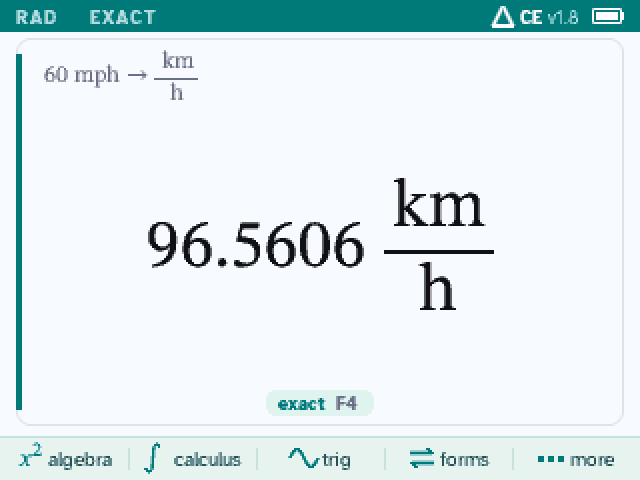
60 miles per hour converted to 96.5606 kilometers per hour

And the rest

Calc 1, 2 and 3, exact.

π²/6, not 1.64493; ln|sec x + tan x| + C. The decimal sits right under the exact answer.

Install

On your calculator in three steps.

Plug the calculator into a computer, open this page in Chrome or Edge, and click. The page checks the calculator, makes room, sends DeltaCE and starts its installer: press enter once on the calculator and it installs by itself.

  • A TI-84 Plus CE or TI-83 Premium CE on OS 5.3 to 5.8.4, and its USB cable
  • Installing erases the calculator's apps and archived files: back up what you want to keep
  • Safari and Firefox can't reach a calculator: use TI Connect CE there

DeltaCE is a computer algebra system: follow your class and test rules (some tests, like the ACT, don't allow one).

  1. 1

    Connect

    Plug in the calculator and turn it on. Close TI Connect CE if it's open.

  2. 2

    Install

    Sends DeltaCE.

  3. 3

    Press enter on the calculator

    When it shows INST, press enter once. It installs and restarts by itself ("RAM Cleared"). Then apps → DeltaCE.
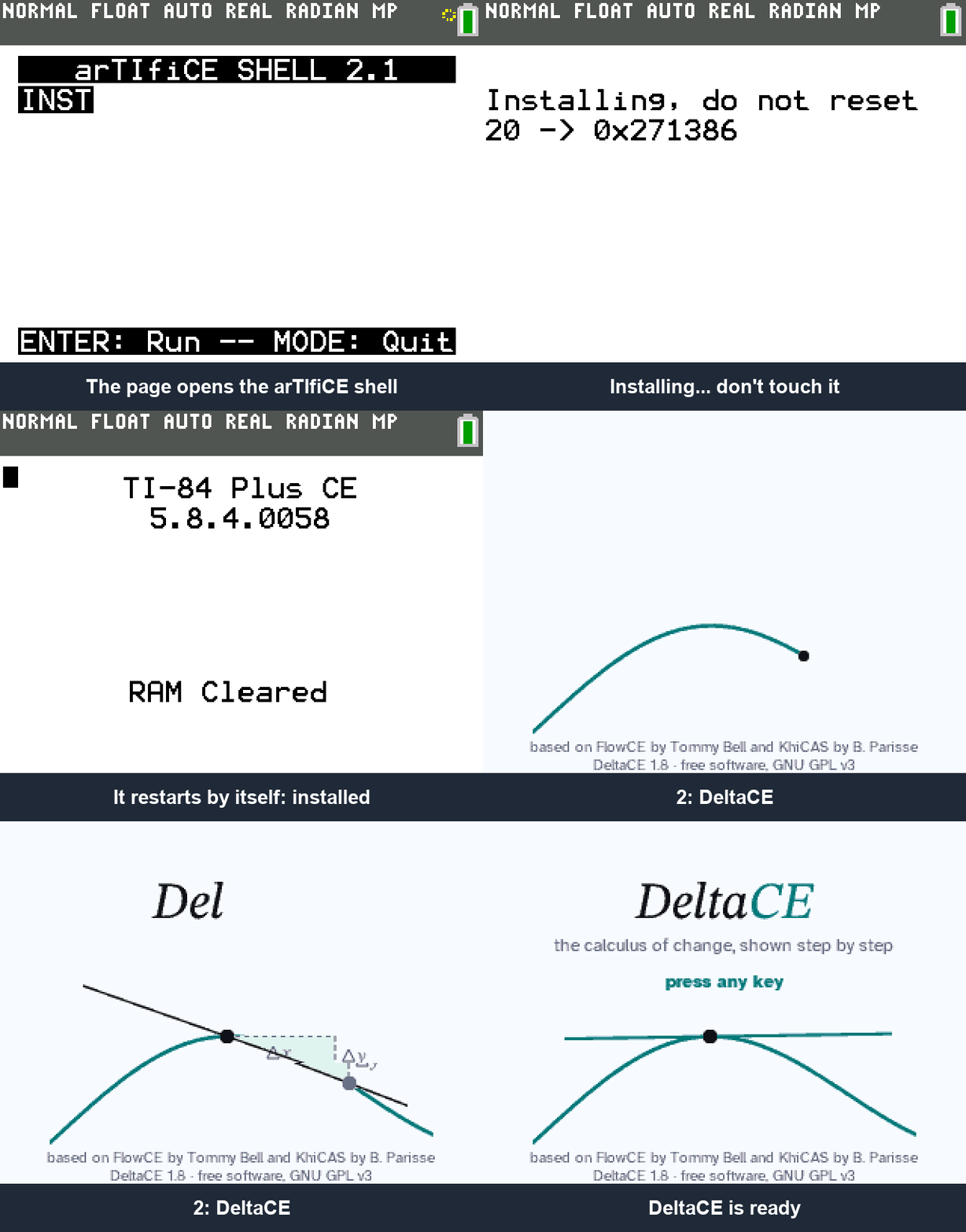
    The arTIfiCE shell with INST, enter, the countdown, RAM Cleared, then apps and DeltaCE
Install with TI Connect CE instead
  1. Clear the archive: 2nd + (MEM) → 7 → ▶ ARCHIVE → 3 → 2.
  2. Download DeltaCE.b84 and send it with TI Connect CE.
  3. prgm → enter → enter opens arTIfiCE. enter starts INST, enter again installs.
  4. At "Success! Will now reset", press enter. Then clear, apps → DeltaCE.
Trouble?
  • Connect fails on Windows: update TI Connect CE to 6.1 or newer, then unplug and replug the calculator.
  • Connect fails on a Mac or Chromebook: close TI Connect CE, then unplug and replug.
  • Linux: add a udev rule such as SUBSYSTEM=="usb", ATTRS{idVendor}=="0451", ATTRS{idProduct}=="e008", TAG+="uaccess" in /etc/udev/rules.d/69-ti-calc.rules, then replug.
  • Still not enough memory after the erase: some apps survive it (often TI's language apps). Delete them: 2nd + → 2 → Apps, del on each.
  • "RAM Cleared" but this page still waits: DeltaCE is installed. Press apps → DeltaCE.
  • Frozen at "Success! Will now reset": press the reset button on the back (a pen tip). DeltaCE stays installed.
  • The calculator acts strangely: clear the RAM: 2nd + → 7 → 1 → 2. DeltaCE stays installed.
  • OS 5.8.5 or newer: not supported yet (the installer's arTIfiCE v2.1 works up to 5.8.4).

Something else, or a wrong answer? Open an issue on GitHub with what you typed.

Versions

Nineteen releases, each one a change.

  1. 1.9Statistics: data in two columns, box plots, fitted curves with r², the points on the graph.
  2. 1.8A look of its own: the teal status bar, the answer card, and the action row under each answer.
  3. 1.7Parametric and polar curves, slope fields; engine fixes for the calculator's 24-bit integers.
  4. 1.6Code placed for the flash cache: heavy calculus 6–8% faster.
  5. 1.5Units fixed everywhere and written the way textbooks write them.
  6. 1.4Equations in x and y on the graph: circles, ellipses, hyperbolas.
  7. 1.3The work behind F4's forms: completed square, long division, partial fractions.
  8. 1.264 KB more room.
  9. 1.1Graph tools: value at x, solve f(x) = …, max and min, labels.
  10. 1.0A new graph screen: pan, trace, exact key points, tables.
  11. 0.9Actions on an answer, menus that remember, step navigation.
  12. 0.8Steps for rational and radical equations.
  13. 0.7Factoring steps.
  14. 0.6Steps for linear and quadratic equations.
  15. 0.5Function analysis.
  16. 0.4The teal accent and the Δ mark.
  17. 0.3Celsius and Fahrenheit, the antiderivative check, value at x.
  18. 0.2Physical units: 72 of them in 8 categories.
  19. 0.1The fork: DeltaCE's name and start screen.